

What if your website’s most important design choice isn’t its colour palette, but how quickly a visitor can understand what you do and what to do next? That’s the practical question behind web design Namibia businesses need to answer: a site should look considered, but it must also make information easy to find and actions clear.
Web design is more than visuals. It connects structure, content, navigation, mobile usability and visual choices to the needs of your organisation and its visitors. When those parts work together, people can find services, understand whether they suit them and take the next step with less effort.
This guide covers the components of effective website design, practical ways to make pages easier to use, and how to turn business priorities into a clear design direction. It also considers how a website can work alongside technology, software and marketing support, capabilities Andreas Digital Agency brings together for organisations across Namibia. Start with your website’s purpose, then shape its pages around what visitors need to know and do.
Key Takeaways
- Shape each page around what visitors need to understand or do, so the website supports a clear business purpose.
- Use layout, typography, colour and imagery as a coordinated system, with page structure and navigation guiding people to useful information.
- Judge web design Namibia by clarity, usability and fit with organisational goals, not by visual polish alone.
- Set a practical design direction by defining your audience, prioritising key tasks, organising content and refining the result.
- Andreas Digital Agency provides websites, portals and digital platforms, alongside related web, technology, software and marketing capabilities.
What web design in Namibia should help a business achieve
Web design shapes how a website looks, works and communicates. It brings page layout, content, navigation and visual choices together so visitors can understand an organisation and find the information they need. A useful design starts with what the organisation needs to explain and what visitors need to do, rather than with decoration alone.
For businesses and organisations across Namibia, a website may be an early point of contact with a prospective customer, partner or community member. A visitor should be able to identify what the organisation does, find relevant service details and understand how to get in touch. If those basics are difficult to find, attractive colours or striking imagery won’t fix the underlying problem.
The purpose of web design is to help visitors understand an organisation, find relevant information and take an appropriate next step. Use that as a practical test for web design Namibia: ask whether each design decision helps the organisation communicate and serve its audience. The principles of web design span several connected disciplines, but their value shows in everyday use, when the website feels coherent and its information is easy to access.
How does web design support everyday business needs?
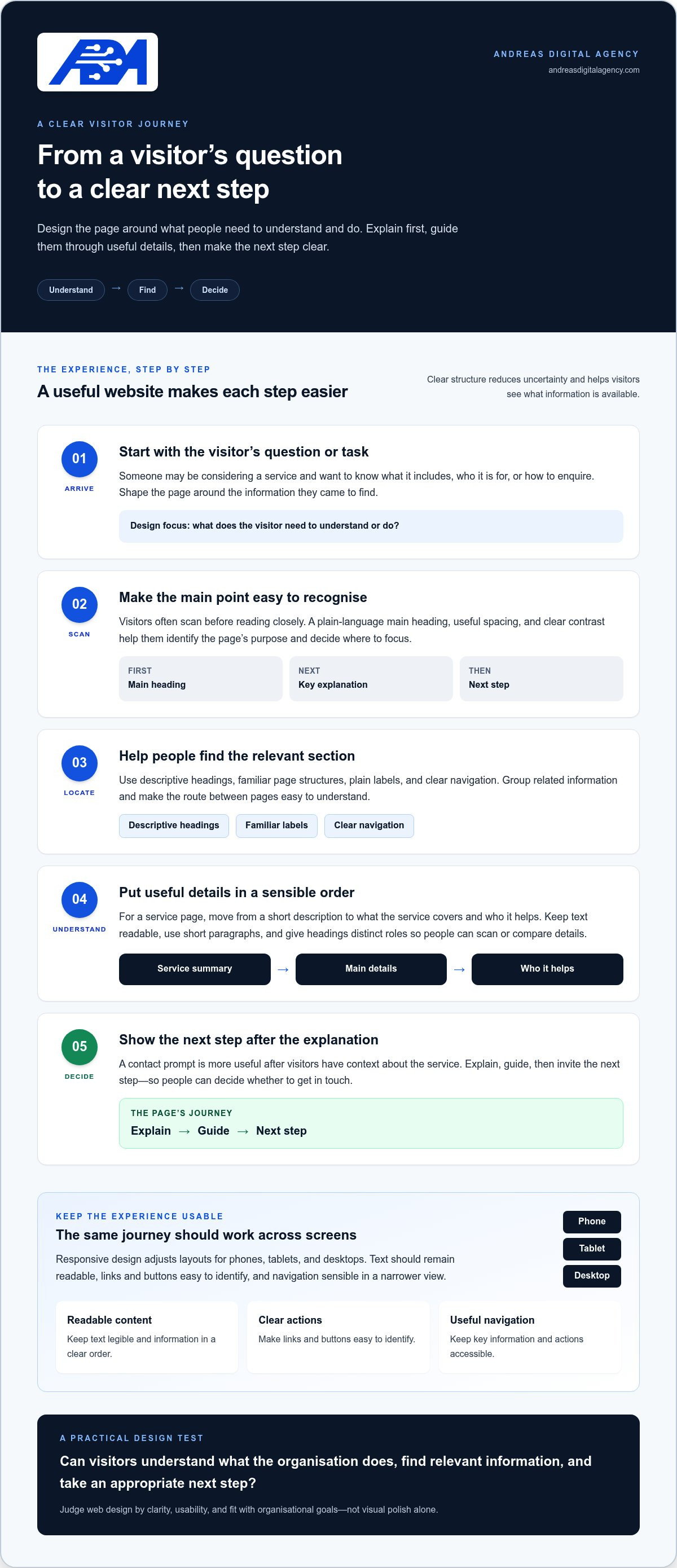
Start with common visitor tasks. Someone considering a service may want to know what it includes, who it is for and how to enquire. A well-structured page puts those answers in a sensible order, using headings that make key details easy to scan. For example, a visitor should be able to move from a short service summary to its main details and then to a clear way to get in touch.
Consistent visual choices also help visitors recognise the organisation as they move between pages. Repeated use of colour, type styles and image treatment creates a unified impression, while readable text and clear spacing keep the content usable. Visual quality matters, but it should support the organisation’s goals. A decorative feature that competes with an important service detail may look distinctive while making the page harder to use.
What does a visitor experience on a designed website?
A visitor typically arrives with a question or task in mind. They scan the main heading, look for a relevant section, then use the navigation or page links to explore further. Clear labels, familiar page structures and readable content reduce uncertainty because people can see where they are and what information is available.
Calls to action work best when they follow useful information. A contact prompt placed after a clear explanation of a service gives visitors context for deciding whether to get in touch. If it appears before key details, they may not yet know what to ask. Design the journey in order: explain, guide, then invite the next step. The result is a site that communicates with purpose rather than simply filling a screen.
The building blocks of effective web design
A website’s design is a set of connected decisions, not a collection of separate visual effects. Layout determines where content sits; visual hierarchy shows what deserves attention first; typography affects how easily people read; and colour and imagery help establish a consistent look. These choices work best when they support the content rather than compete with it. A dramatic image, for example, should explain a service or set the scene, not push essential information out of view.
Page structure and navigation give those elements an order. Group related information, label pages in familiar language, and make the route between them clear. If an organisation explains several services, visitors should be able to distinguish service pages from general information without guessing. In web design Namibia, this practical organisation matters as much as visual style because it helps people use the site with a clear purpose.
How layout and visual hierarchy guide attention
Visitors often scan before they read closely. Headings, spacing and contrast help them spot the main point, identify supporting details and decide where to focus next. Make the most important information easy to notice, but don’t give every element equal emphasis. A clear page gives the headline, key explanation and next step distinct visual roles.
Consider a service page. It might begin with a plain-language description, then explain what the service covers, who it helps and how to enquire. Descriptive headings let visitors jump to the answer they need, while short paragraphs and useful spacing make details easier to compare. Clear layout and visual hierarchy help visitors find the right information without searching through every part of a page.
Why usability and mobile layouts matter
Responsive web design adjusts a page’s layout to suit different screen sizes, so content remains usable on a phone, tablet or desktop. That means more than shrinking a desktop page: text should remain readable, links and buttons should be easy to identify, and navigation should still make sense in a narrower view. Check that key information and actions remain accessible across devices.
Usability also depends on plain labels, legible text and a sensible content order. Avoid relying on colour alone to distinguish important information, and use headings that describe what follows. Keep navigation options clear so visitors can move between pages without losing their place. Good design can make information easier to use, but it doesn’t guarantee search rankings or site speed on its own. Those depend on other parts of a website too.
When planning a website, reviewing websites and digital platforms alongside your communication needs can help connect design choices to the wider digital solution.
Web design is more than appearance: how to judge whether it works
A polished website can make a strong first impression, but appearance alone doesn’t show whether the design is doing its job. A page may look refined and still leave visitors unsure what the organisation offers, where to find details or how to proceed. Effective design brings visual appeal together with clarity, usability and the organisation’s purpose.
Assess a website by using it as a visitor would. Look beyond colour choices and ask whether key information is easy to find, whether the page makes sense without explanation, and whether the next step feels relevant. For web design Namibia organisations can put to work, the test isn’t simply “Does this look good?” It’s also “Does this help the right visitor do the right thing?”
Signs that a design supports visitors
Begin with the pages people are most likely to need, such as the home page or a service page. Can someone tell what the organisation does from the heading and opening content? Do page titles and navigation labels use plain, recognisable language? If visitors have to guess what a menu item means, the structure may need clearer wording.
Then check whether related pages feel like parts of the same website. Consistent headings, colours, type styles and page layouts help visitors recognise where they are. Consistency doesn’t mean every page must look identical; it means visual choices support a predictable experience. Keep the content prominent, with visual details helping people read and understand rather than making them work around the design.
Try a simple review: open a key page and give yourself a task, such as finding a service description or locating contact information. Notice where you pause, what you overlook and whether the page provides enough context to continue. These observations reveal practical issues more clearly than a general judgement about whether the design looks modern.
Common design trade-offs to consider
Visual effects can add character, but movement, large decorative elements or strong colour contrasts may compete with a headline or an important detail. Keep an effect when it supports the message; reduce it when it draws attention away from the information a visitor came to find.
Navigation involves similar choices. Adding a menu item for every page may seem comprehensive, yet a long or layered menu can make it harder to identify the right route. Group related topics under clear labels, and give priority to the pages most visitors need. The aim isn’t to hide useful information. It’s to make the options understandable at a glance.
Review design decisions against real visitor needs and organisational priorities. Ask: Can a new visitor explain what this organisation does? Can they find the information needed to decide what to do next? Does the visual style help them focus, or interrupt their path? Clear answers make design a practical part of how the organisation communicates, not just a finishing layer.
A practical way to shape website design for Namibian audiences
A useful design direction comes from understanding who the website serves and what those visitors need to accomplish. For an organisation serving people across Namibia, make choices based on its actual audience and purpose, not assumptions about where visitors live or how they access information. A short planning process can turn broad ideas into clear priorities for content, pages and features.
Start with the visitor and the website’s purpose
Identify the main audiences first. Prospective customers may need to understand services, while existing customers may be looking for practical details or a way to get in touch. Choose a few priority tasks the website should support, then decide what information each visitor needs to complete them. This gives the design a working brief grounded in real organisational needs.
- Define the audience. Name the groups the organisation needs to serve and the questions each is likely to bring.
- Choose priority tasks. Decide what visitors should be able to find or do, such as reviewing a service or making an enquiry.
- Organise the content. Put essential information on the main pages and move supporting details deeper into the site.
- Review and refine. Check whether the page order, navigation and wording support those tasks.
This process keeps early design decisions focused. A business website planning checklist can also help organise broader preparation before design work begins.
Review a design before it becomes the finished website
Review the proposed page structure against the tasks you identified. Can visitors see where to begin? Do the menu labels describe what each page contains? Read the text alongside the visuals and calls to action, because a clear heading can lose its value if an image or button pulls attention elsewhere. Feedback is most useful when it refers to agreed goals rather than personal preferences alone.
- Can a visitor identify the organisation’s purpose from a key page?
- Can they locate priority information using the page layout and navigation?
- Do the text, visuals and next steps work together without competing?
Use these answers to adjust the design before it becomes the finished website. Apply the same discipline to feature choices: prioritise what supports a visitor task, and defer extras that don’t yet serve a clear purpose. The guide to website features for small business can help distinguish useful essentials from features that can wait.
Andreas Digital Agency’s website design services support organisations in shaping websites around their priorities.
How Andreas Digital Agency connects web design with practical digital needs
A website is one part of an organisation’s wider digital setup. Andreas Digital Agency provides websites, portals and digital platforms for organisations across Namibia, with web, technology, software and marketing capabilities within the same agency. This makes it possible to consider how a website relates to other digital needs while keeping design decisions tied to the purpose already identified.
A practical approach to web design Namibia starts with the task. If visitors mainly need to understand services, find essential information and make contact, a straightforward website may be the right fit. If the organisation needs people to complete defined tasks through an online system, a portal or platform may be more appropriate. Let the audience and workflow guide the choice rather than assuming a more complex solution is automatically better.
Connect website design to the wider digital picture
Begin with the website’s role. A clear set of public pages may be enough to explain an organisation and its services. A portal or platform can be relevant when users need a more structured way to access information or complete tasks. Technology and software capabilities can inform those wider requirements; marketing can help align the website’s content with how the organisation communicates. These are connected possibilities, not a checklist every organisation must adopt.
For example, an organisation might first need a clear service website, while another may have a workflow that calls for a platform. The distinction comes down to the user need: public information and enquiries may call for one kind of site, while a defined process involving ongoing interaction may call for another. Starting with that distinction keeps the design practical and avoids adding features without a clear purpose.
Take a clear next step with Andreas Digital Agency
Before discussing a website project, write down who the site needs to serve, what those visitors need to understand or do, and what the organisation wants the site to support. Note any existing software or processes the website may need to work alongside. These points help frame the design discussion around priorities rather than preferences alone.
Andreas Digital Agency brings web, technology, software and marketing disciplines together, so a website can be considered in relation to an organisation’s broader digital requirements. Not every discipline needs to be involved. The goal is to consider the design direction in context and keep the solution proportionate to the need.
Andreas Digital Agency’s website services give organisations a starting point for discussing their audience, priorities and website purpose.
Set a clear direction for your next website step
Before choosing page layouts or visual details, write a short design brief. State who the website should serve, the main action visitors should be able to take, and what they need to know before taking it. This gives your organisation a practical reference point as decisions develop and keeps the work focused on purpose rather than passing preferences.
For organisations considering web design Namibia, Andreas Digital Agency serves organisations nationally, bringing web, technology, software and marketing capabilities together within one agency. That broader context can help connect a website’s role with other digital needs, while keeping the solution grounded in what your organisation requires.
Start by outlining your priorities, even if they’re still taking shape. Explore Andreas Digital Agency’s website services to discuss a design direction that supports your organisation’s needs.
Frequently Asked Questions
What is web design?
Web design is the planning of a website’s visual presentation, page structure and visitor experience. For example, a business introducing several services might use separate, consistently structured pages so readers can compare what each service covers. Design decisions depend on the organisation’s purpose and its audiences. For web design Namibia businesses can use effectively, consider whether each page helps people understand the organisation and find a suitable next step.
Is responsive web design important for a business website?
Yes, responsive design helps a website adjust to phones, tablets and desktop screens, supporting visitors using different devices. Review more than the page’s appearance at each size: check that visitors can still read a service description, open the menu and reach a contact option without awkward scrolling or unclear controls. Responsive design contributes to usability, but it doesn’t guarantee higher search rankings or business results.
How much does web design in Namibia cost?
There isn’t one price that applies to every website, because the work depends on the project’s scope. A small informational site has different requirements from a website with extensive content or portal and platform needs. Before discussing a project, list essential pages, content requirements and any functions visitors need. That outline helps define a relevant scope rather than relying on a generic estimate that may not reflect the organisation’s needs.
Can a website’s design be changed after it launches?
Yes, a website’s design and content can be refined after launch as the organisation’s needs change. For instance, if a service changes, its page may need updated information and a clearer route to the next step. Start by identifying the specific issue, such as outdated content or a confusing page sequence, then prioritise changes that address it. Reviewing one issue at a time keeps improvements focused and manageable.
How long does it take to design a website?
The time required depends on the scope, page count, content readiness and how decisions and feedback are handled. A straightforward informational website and a project involving portals or platform requirements have different planning needs. Organisations can prepare by confirming who will provide content, who will review it and how priorities will be decided. Clear responsibilities and timely feedback help keep the work organised, though they don’t establish a universal timeline.
Does web design affect a website’s visibility in search results?
Web design can support a clearer site structure, helping visitors move between relevant pages and understand their content. Search visibility also depends on factors beyond visual design, including useful, relevant page content and technical considerations. For example, a well-organised service page can explain its subject clearly, but its appearance alone won’t ensure it ranks highly. Treat design as one part of a broader effort to make the website useful and easy to understand.


