

What if the best small-business website is the one with fewer features? Long checklists can make choosing website features for small business feel like a technical project, even when customers simply need to understand what you offer, find key information, trust your business, and take the next step. If those tasks are difficult, adding more functionality may create clutter rather than help.
It’s reasonable to want a website that feels complete, but completeness doesn’t mean including every available tool. A clear baseline gives visitors the essentials without making the site harder to use or maintain. The right priorities depend on what your customers need to do and how your business works.
This article outlines the core features that help customers find information, build confidence, and get in touch. It also separates useful additions from features that can wait, so you can focus on what supports real customer tasks and business operations. Whether you’re planning a straightforward website or a broader digital platform, a task-first approach keeps decisions practical and the result easier to manage.
Key Takeaways
- Choose website features for small business by matching them to what visitors need to do, not by following a long checklist.
- Prioritise clear business and service information, then make the next step easy to find.
- Review mobile usability, accessibility, trust, and security as related but distinct parts of a reliable website.
- Add online sales, booking, events, or publishing tools when they serve a clear purpose and someone can maintain them.
- Use a simple launch-and-review process to test the site and keep its content, forms, and access up to date.
What should website features for small business actually achieve?
A website feature is any page, function, or quality that helps a visitor complete a task. A service page explains what you do; a contact form gives someone a way to make an enquiry; clear navigation helps them find the right information. The format can vary, but the purpose should be practical. A basic overview of how websites bring content and functions together is available in What is a Website?
An effective small-business website feature helps visitors complete a task or helps the business handle that task reliably.
For visitors, the main jobs are straightforward: understand the offer, assess whether the business seems credible, find useful details, and decide what to do next. A feature earns its place when it reduces uncertainty or supports an operational need. If it does neither, it may add work for the business without improving the customer experience.
Start with the questions visitors need answered
Think about what a first-time visitor needs to know before taking action. They should be able to identify what the business offers, who it serves, and how to proceed. A person considering a service may need to understand its scope; someone comparing options may want to see relevant examples or practical details. Put the answers where visitors expect to find them, rather than hiding them behind vague labels or decorative elements.
Use customer questions to shape both page content and navigation. If people often ask what a service includes, give that information a clear place. If they need to know how to make an enquiry, use a familiar label such as “Contact” rather than an abstract phrase. This keeps the first visit focused on useful information and helps visitors move through the site with less guesswork.
Connect each feature to a practical business outcome
Before adding a page or function, write down the task it supports. That task may belong to a customer, such as finding service details, or to the business, such as receiving enquiries in an organised way. A feature should make one of those tasks clearer, easier, or more manageable. This simple test helps distinguish a useful addition from a feature that only sounds impressive.
For example, a frequently asked questions page can address recurring customer queries, while a form can collect the information staff need to respond appropriately. Keep a form focused on details that help with the enquiry. If the team has no plan to review submissions, the form may create an administrative burden instead of helping.
Design still matters. A clear layout, readable text, and consistent visual choices help people understand information, but attractive design cannot replace the information itself. A polished page that leaves visitors unsure what the business does has missed its purpose. Map proposed features before building them:
- Visitor task: What question or action does this address?
- Business outcome: What process does it support?
- Ongoing responsibility: Who will keep the content or function useful?
If those answers are unclear, set the feature aside for review. The best website features for small business are not necessarily the most advanced; they are the ones that help customers move forward and fit the way the organisation works.
Which essential website features should a small business include?
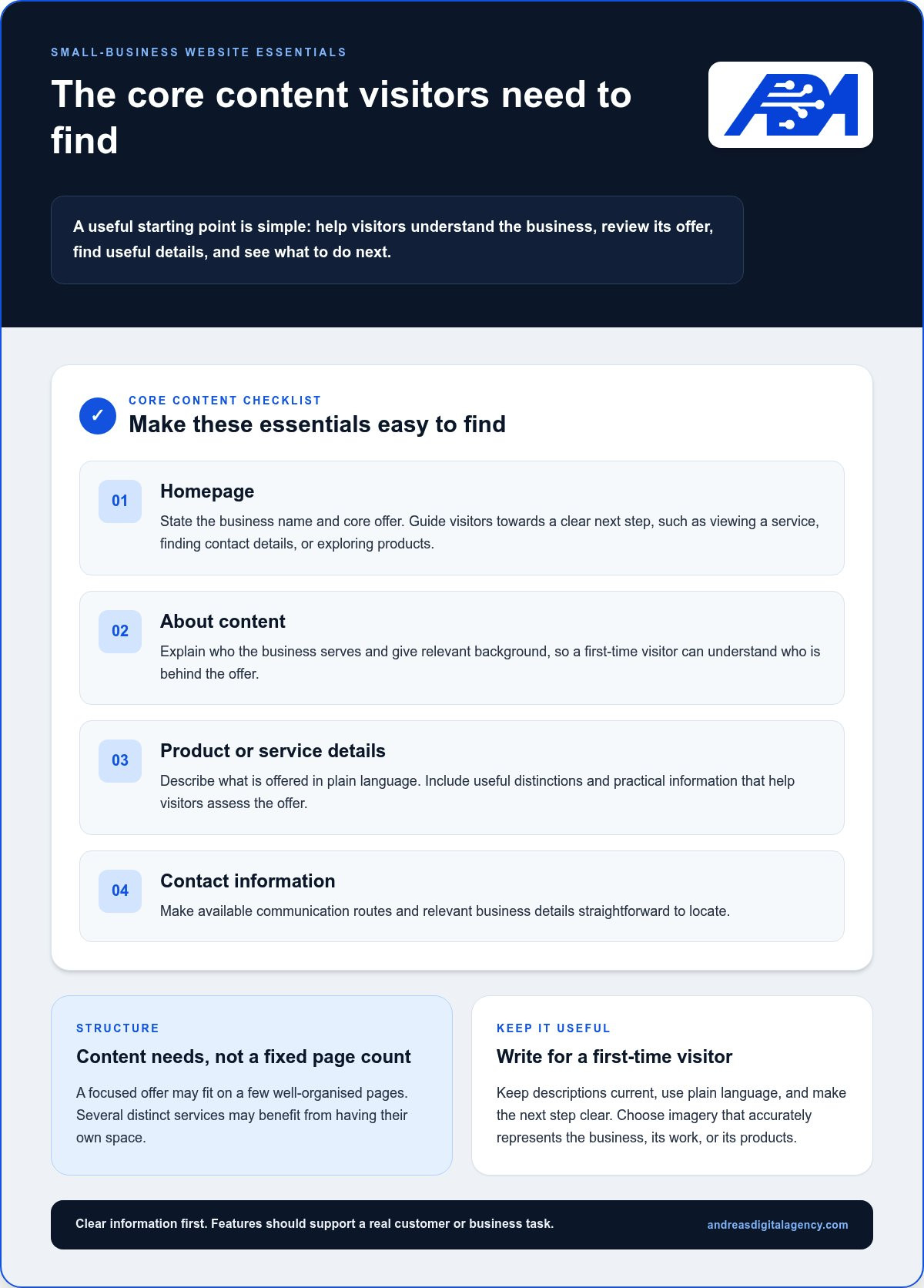
A useful starting point is a small set of pages and details that help visitors understand the business, review its offer, and take an appropriate next step. The homepage should identify the business and what it does, then guide visitors towards the most relevant action. That might be viewing a service, finding contact details, or exploring products. Be specific enough that someone unfamiliar with the business can understand the offer without having to interpret a vague slogan.
Make the business, its offer, useful details, and the next step easy to find.
Core pages that explain the business
Most small-business websites need content that covers the homepage, the business itself, its products or services, and contact information. These are content needs, not a fixed page count. A business with a focused offer can combine background and service details on a few well-organised pages; a business with several distinct services may benefit from giving each one its own space. In either case, write for a first-time visitor and keep descriptions current.
- Homepage: State the business name, core offer, and a clear next step.
- About content: Explain who the business serves and provide relevant background.
- Offering details: Describe products or services in plain language, including useful distinctions or practical information.
- Contact information: Make available communication routes and business details easy to locate.
Use imagery that accurately represents the business, its work, or its products. A relevant image can help visitors understand what they’re looking at, while a generic or outdated one may create the wrong impression. Keep text and images consistent with the actual offer. The Forbes guide to small-business website best practices also offers useful design considerations, but the essentials should still reflect your customers’ needs.
Contact and action features that reduce friction
Place contact routes where visitors can find them without searching through every page. Depending on how the business communicates, these may include a phone number, email address, physical business details, or an enquiry form. Label each route clearly and keep the details accurate, so visitors can choose a suitable way to get in touch.
A form can help collect the information needed to respond to an enquiry. Keep it focused: ask only for details that serve the conversation, explain what the visitor should submit, and provide a clear confirmation after submission. Unclear instructions or unnecessary fields can make a simple enquiry feel like work.
Match calls to action to the page and the visitor’s readiness. A service page might invite someone to enquire, while a product page may guide them towards a purchase. A booking action makes sense where visitors can arrange an appointment. Use direct wording that describes what happens next, rather than a vague button label.
For organisations planning a site around customer tasks and business processes, website and digital platform development can bring the content structure and practical requirements into one plan.
How do mobile usability, accessibility, trust, and security affect a business website?
A website can look polished and still frustrate visitors if they can’t find information, use its controls, or feel confident sharing details. Usability, accessibility, trust, and security work together, but they address different needs. Usability helps people complete tasks; accessibility helps people with different abilities use the site; trust comes from accurate, dependable information; security helps protect the connection and the site’s processes.
These qualities are practical checks, not decorative extras. A confusing menu slows visitors down, while inaccessible content can prevent some people from using the site at all. HTTPS is useful, but it doesn’t by itself prove that every form or business process is secure.
Make the site usable across devices and abilities
A responsive layout adjusts to different screen sizes so visitors can read and use the site on a phone, tablet, or larger screen. Use readable text, clear navigation, and controls that are easy to select. Test key tasks on a phone as well as a computer, including finding contact details and completing an enquiry form. WCAG, the Web Content Accessibility Guidelines, is a recognised reference for making web content more accessible; using it as a guide doesn’t alone establish compliance with any particular requirement.
Build trust through dependable website basics
Keep business details, service descriptions, and contact information consistent and current. HTTPS indicates that the connection between a browser and website is encrypted, but it isn’t a complete security assessment. For broader small-business cybersecurity considerations, see the FCC guidance on cybersecurity for small businesses. Review the website’s forms and processes as well as its connection security.
Use this short checklist to test common website qualities:
- Mobile layout: Check that text fits the screen, menus are usable, and important actions aren’t difficult to reach.
- Readable content: Confirm that text is easy to read and headings make information easier to scan.
- Keyboard access: Use the keyboard to move through navigation and controls, and check that the current selection is visible.
- HTTPS: Confirm that pages load over HTTPS, while treating it as one security check rather than proof that all processes are protected.
- Working links and forms: Open key links, submit a test enquiry, and check that instructions and confirmation messages appear as intended.
These checks help separate appearance from performance. A neat design supports confidence, but it can’t make up for confusing navigation, unreadable text, broken links, or a form that gives no clear indication that it worked. Review the site after changes, since new content or updated functions can affect how key tasks work.
For support planning a site around these practical needs, explore ADA Web’s website and digital-platform services.
Which optional website features should a small business prioritise next?
Once the core site is working, consider additions that address a real customer need or improve a business process. Online sales, bookings, event registration, customer resources, and publishing can all be useful, but none belongs on every website. The right choice depends on how customers interact with the business and whether someone can keep the feature working and up to date.
Use a simple order: fix anything that blocks an existing visitor task, add the function most likely to help customers or staff, then review how people use it. This keeps new website features for small business tied to actual needs and avoids building extra complexity just because a tool is available.
Match interactive features to the way customers work
Choose a feature based on the step customers need to take. A catalogue and online payment function suit a business that sells directly through its website. Booking tools can help when customers need to select an appointment time, while event registration is relevant when people need to sign up for a scheduled activity. If customers mainly need to ask a question, a clear enquiry route may be more useful than a booking system.
Other additions support different needs. A customer resource area can organise useful documents or guidance; a publishing section can share updates and answer recurring questions. Each brings ongoing work, such as updating information or managing submissions. Before adding one, name the person responsible, define what success looks like for the task, and decide how it will be maintained. If ownership is unclear, defer it.
- Sell online: Consider product information and online payment when the website is part of the sales process.
- Arrange a time: Consider booking when customers need to select an appointment rather than request one.
- Register or learn: Consider event registration or customer resources when they support a recurring customer need.
- Share updates: Publish content when the business can keep it useful and current.
Use analytics and search features to guide improvements
After launch, use observed activity to find where an improvement may help. Google Analytics 4 can help review website activity when it’s properly configured, including relevant actions the business has chosen to measure. Google Search Console provides information about how a site appears in Google Search and can surface technical or indexing issues. Neither tool decides what to build; use the information alongside customer questions and feedback.
Look for signs of friction. If visitors reach a page but don’t complete its intended task, check whether the instructions, content, or next step are clear. If people repeatedly ask for information that’s difficult to find, improve the relevant page or navigation before adding a new function. Prioritise changes that remove a known barrier, assign someone to maintain each addition, and review whether it continues to serve its purpose.
For a website or broader digital platform planned around customer and operational needs, ADA Web develops websites and digital platforms.
How can a small business launch and maintain the right website features?
A manageable website launch is a starting point, not a demand to build every possible feature at once. Set priorities around what visitors need to do, publish the essentials, then improve the site as customer needs and business processes change. This approach keeps decisions practical and gives each addition a clear reason to be there.
Launch a manageable first version
Before sharing the site widely, check that its core information is clear, contact routes work, mobile layouts are usable, and important trust details are present. Test the site as a visitor would, not only from the editing screen. Keep a list of lower-priority improvements so they can be reviewed later rather than delaying launch for extras that don’t support an immediate need.
Use this sequence to get the first version in order:
- Define visitor tasks. Write down what people need to find or do, such as understanding an offer, locating contact information, or making an enquiry.
- Publish essentials. Add the pages and details that support those tasks, and make sure the content reflects the current business.
- Test the experience. Check key pages and actions on a phone and a larger screen. Submit forms, follow links, and confirm that instructions are clear.
- Review usage. Look at customer questions and available website activity to see whether visitors can find what they need and complete the intended actions.
- Improve deliberately. Fix barriers first, then prioritise additions that support a clear customer task or business process.
Maintain the site as customer needs change
A website stays useful when someone is responsible for keeping it accurate and functional. Assign ownership for content updates, form testing, and managing who can access website editing tools. These responsibilities can sit with one person or be shared, but each task needs a clear owner so updates and checks don’t get overlooked.
Review key pages when services, contact details, or common customer questions change. As part of routine maintenance, check that links still work, forms submit as intended, and mobile layouts remain usable after content or site changes. Keep a simple record of what was checked and what needs attention; it helps turn maintenance into a repeatable process instead of a task handled only after a problem appears.
A standard website may need to grow into a portal or digital platform when customers or staff need to complete structured processes online, rather than simply read information or send an enquiry. For example, repeated steps that involve exchanging information or accessing organised resources may call for a more purpose-built digital setup. The right scope depends on the process the business needs to support.
ADA Web develops websites, portals, and digital platforms, bringing related technology, software, marketing, and consulting capabilities together. If you’re ready to plan a site or a broader digital-systems project, discuss your website or digital-systems project with ADA.
Plan the next useful step for your website
Your website can develop alongside your business. Rather than planning every possible addition now, choose one customer journey or internal process that could work better online. Define what a smoother experience would look like, then use that outcome to guide your next decision about website features for small business.
This keeps the plan grounded in real work. A change might involve refining existing content, improving a process, or building a more structured digital experience. ADA Web develops websites, portals, and digital platforms, with website, technology, software, and marketing support brought together through Andreas Digital Agency. That combination can help connect the online experience with the way your organisation operates.
If you’re ready to turn a defined need into a practical project, plan your website or digital-platform project with ADA. Start with the task that matters most, and let each next step build from there.
Frequently Asked Questions
Can a small business start with a one-page website?
Yes, a one-page site can work when the business has one focused offer and only a few key points to explain. Group information under clear sections so visitors can move directly to services, background, and contact details without scrolling through unrelated content. Keep the next action visible. If people regularly need more detail about different services, split those topics into separate pages to make the site easier to scan.
How many pages does a small-business website need?
There’s no fixed page count; use the structure that makes the offer easy to understand. A business with closely related services might explain them on one page, while distinct services may need individual pages so visitors can find relevant information quickly. As you plan website features for small business, review the menu when you add an offer or notice customers repeatedly asking where to find specific details.
Does every small business website need a blog?
No. A blog makes sense if you have useful subjects to cover and can keep the information current. For example, a business might answer recurring questions about choosing or using its services. Before adding a blog, outline a few relevant topics and decide who will review and publish them. If that plan isn’t realistic, focus on keeping service information accurate instead of creating a section that may sit unused.
Is a free website builder enough for a small business?
It can be enough for an early test or a simple online presence, depending on the builder’s limits and your needs. Consider whether the site can use your preferred domain, represent your brand, support accessible content, and connect with the tools your business relies on. Also think about how you’ll maintain the site and manage your content over time. Choose based on these practical needs, not the builder’s feature list alone.
What should appear near the top of a small-business homepage?
Put a clear description of the business and its offer near the top, followed by one useful action for the visitor. For example, a service business might direct people to view its services or make an enquiry. Keep the message specific rather than relying on a slogan that could describe any company. Check the first screen on a phone, where long headings or several competing buttons can quickly crowd the layout.
How often should a small business update its website?
Update information whenever something changes, rather than waiting for a major redesign. A new service, changed contact detail, or repeated customer question may call for a prompt edit. Separately, set a manageable review routine for checking important pages, links, and forms. A simple change log can record what was updated and when, helping whoever manages the site spot outdated information and follow up on unfinished fixes.

