

A website project rarely gets complicated because of the code first. More often, the business goal, page list or required functions are still unclear. Business website planning brings those decisions into focus before development begins.
If you’re unsure where to start or worried that an important page or feature will be missed, that’s understandable. A website needs to serve the business while helping people find information, take action and get support. Without a shared plan, it can be difficult to turn those needs into clear development requirements.
This practical checklist will help you connect website decisions to business goals, identify what users need and set priorities for pages, content and functionality. It also covers project scope, content responsibilities and the work a site needs after launch, so the plan accounts for more than the initial build.
Work through each step to create a clear starting brief, define what belongs in the project and agree on the next actions. For businesses across Namibia, that preparation gives a development project a practical foundation and keeps decisions grounded in real needs.
Key Takeaways
- Use business website planning to turn broad business needs into clear, prioritised requirements before development starts.
- Separate essential launch features from improvements that can be considered later to keep the project focused.
- Map the sitemap and main user journeys around what visitors need to do and what the business needs to achieve.
- Build a concise brief that records decisions, open questions and who is responsible for each next action.
- Agree on the project scope and delivery plan before choosing technical solutions or beginning development.
Business website planning: Define what the website must achieve
Business website planning turns business needs into decisions that guide a website project. It helps a team agree what the site is for, who it must serve and what visitors should be able to do. Those decisions give development a clear direction before design and technical choices begin.
A plan won’t remove every project risk, but it can reduce avoidable rework. If the team agrees that visitors need to find service information and submit an enquiry, those needs can shape the page structure, content and enquiry form. Without that clarity, requirements may emerge late and force changes to work already completed. Website planning also gives people across the organisation a shared reference point as the project moves through the wider web development process.
Set website goals that support everyday business needs
Start with the organisation’s broad purpose, then define the website’s specific job. A business may aim to provide reliable services; its website might help prospective customers understand those services and send a useful enquiry. State goals as actions people can take, rather than broad ambitions such as “improve our online presence.”
List requests from departments, then rank them by how directly they support the main business need. A clear service enquiry process may be essential for launch, while a resource library may be a useful later improvement. Prioritising doesn’t dismiss other ideas. It shows what the first version must do and what can wait.
Connect each priority to an outcome the organisation can recognise. Easier access to opening information, for example, may reduce avoidable questions, while a clear enquiry route may help staff receive more complete requests. Choose a small set of indicators the team can realistically review after launch, such as completed enquiry forms, visits to key information pages or requests for support. Record a starting point if one is available, then review the same indicators consistently. Don’t choose measures just because they’re easy to count; they should help the team judge whether the website is doing its job.
Identify the people the website needs to serve
List the main groups who will use the site and the task each group needs to complete. These might include prospective customers comparing services, existing customers looking for contact details, or staff accessing internal resources. Keep each description tied to a practical need, not a guess about age, location or technical ability.
Use existing customer feedback, enquiry records and support questions where available. Note what people ask, what information they struggle to find, and any access needs or barriers they mention. A useful audience profile can be brief: “A prospective customer needs to compare service options and understand how to enquire.” This gives the content and development team a real task to plan for.
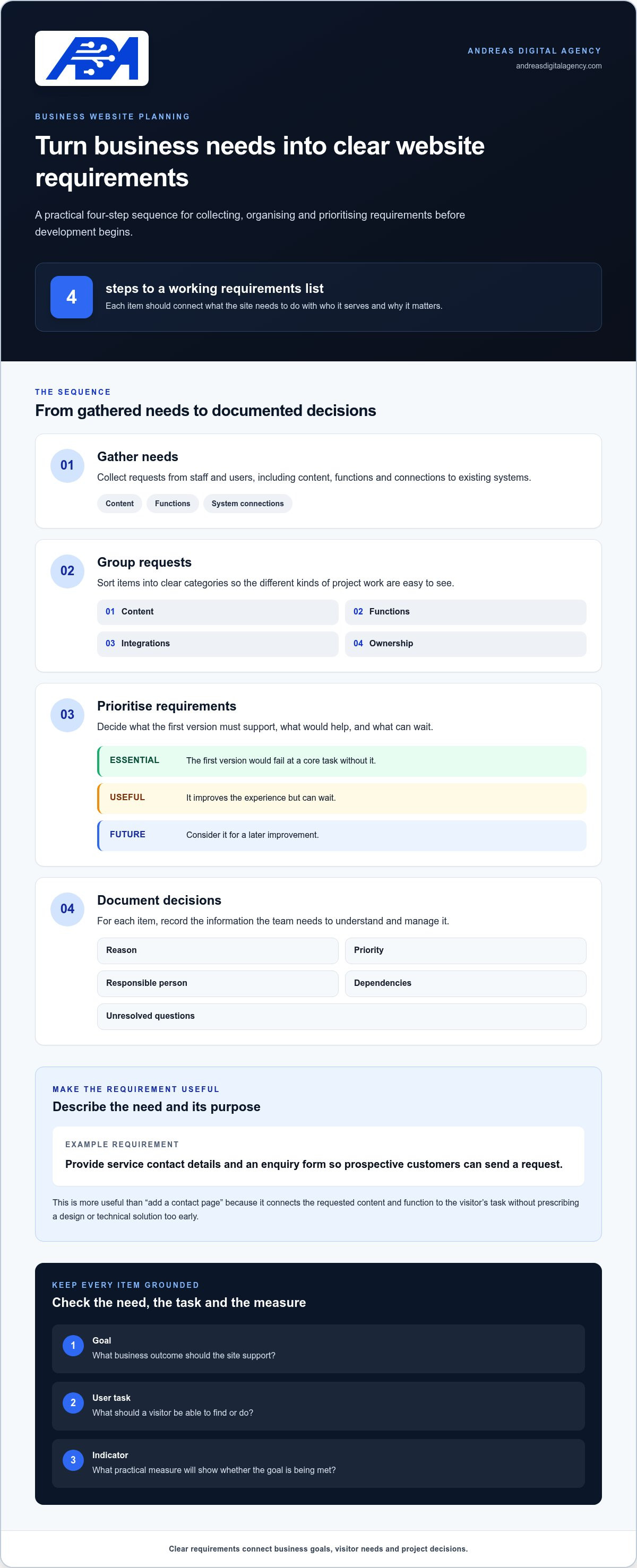
- Goal: What business outcome should the site support?
- User task: What should a visitor be able to find or do?
- Indicator: What practical measure will show whether the goal is being met?
These answers create a working basis for the next planning decisions. Keep them visible and specific so each proposed page or function can be assessed against an agreed need.
Turn business needs into clear website requirements
Once the website’s purpose is clear, translate it into requirements a project team can act on. A requirement should describe what the site needs to contain or do, who it serves and why it matters. This keeps requests from becoming a loose wish list and gives each decision a practical basis. The SBA business plan guidance also stresses defining goals and understanding the market, useful foundations when deciding what a website must support.
Use a simple sequence to turn needs into a working set of requirements:
- Gather needs. Collect requests from staff and users, including content, functions and connections to existing systems.
- Group them. Sort requests into content, functions, integrations and ownership so different kinds of work are easy to see.
- Prioritise them. Decide what the first version needs to support, what would help and what can be considered later.
- Document decisions. Record the reason, priority, responsible person, dependencies and any unresolved question for each item.
Keep each requirement specific enough to guide a decision. "Add a contact page" is less useful than "Provide service contact details and an enquiry form so prospective customers can send a request." That wording connects the item to its purpose without prescribing a design or technical solution too early.
Requirement category | Example item | Purpose
Content: Service descriptions | Help visitors understand what the business provides.
Function: Enquiry form | Give visitors a clear way to submit a request.
Integration: Enquiry routing to an existing system | Ensure requests reach the staff responsible for responding.
Ownership: Named content approver | Keep information accurate and establish who signs it off.
Sort essential requirements from later improvements
For each request, ask what users or staff would struggle to do without it. Mark the item essential if the first version would fail at a core task without it; useful if it improves the experience but can wait; or future consideration if its value depends on later needs. Add a short reason beside the label. Flag dependencies too: a search function relies on organised content, while a booking feature may depend on a connected system, approved information and staff processes.
Document responsibilities, constraints, and open decisions
Name the people responsible for supplying text, images and subject-matter input, as well as those who approve them. Record budget boundaries, timing expectations and internal approval steps as the organisation defines them. Don't leave these as assumptions. If a decision is open, identify its owner and next action, such as confirming which service details are current or deciding how enquiries should be routed.
Clear requirements make business website planning more useful because they connect each requested item to a purpose and a person responsible for it. If you're preparing a website, portal or platform brief, Andreas Digital Agency can help turn documented needs into a development project.
Plan the website structure, user journeys, and content
A sitemap and page plan turn agreed requirements into a usable structure. They show which information belongs where, how visitors move between pages and what each page should help them do. For business website planning, sketch these relationships before choosing colours, layouts or other visual details. This keeps design decisions tied to real user tasks and business priorities.
Create a sitemap that is easy to navigate
Start with the main tasks visitors need to complete, then group related information under plain, recognisable page labels. For example, a prospective customer might need to understand services, review relevant details and find a way to enquire. An outline could group service information under “Services” rather than scattering similar pages across the navigation. Keep priority pages easy to reach, then use a simple sitemap to spot missing steps, repeated content and pages with no clear purpose.
Map journeys before visual details
Trace a few important journeys from the visitor’s first question to the next useful action. A person seeking service information might arrive on a service page, look for what’s included, then follow a clear enquiry prompt. Note what information they need at each step and where a gap could make them stop. These journey sketches help the team plan page order and links before discussing how each screen should look.
Use a page-planning table to keep structure and content decisions connected. Give each page one primary audience and purpose, then identify the key information and next action. For example:
Page: Home | Audience: First-time visitors | Purpose: Orient visitors | Content: Main services and overview | Next action: View a relevant service
Page: Service details | Audience: Prospective customers | Purpose: Explain an offering | Content: Description, images and answers to common questions | Next action: Submit an enquiry
Page: Contact | Audience: People ready to get in touch | Purpose: Make contact options clear | Content: Contact details and enquiry form | Next action: Send a request
Plan content around questions and actions
Before assigning content owners, list the questions each page must answer. A service page may need to explain what the service is, who it suits and how to enquire. Then note the materials required, such as text, images, forms or downloadable documents. This makes content gaps visible while there’s still time to plan for them. Keep service names and calls to action consistent across pages, so visitors aren’t left wondering whether similar labels lead to different outcomes.
Review the sitemap and page plan together. If a page has no clear audience, useful content or next action, revise its purpose or remove it from the initial structure.
Prepare a practical website brief before development
A website brief is a concise working record of the decisions that will guide development. It brings the project’s goals, priority audiences, requirements, sitemap, content plan and responsibilities into one place. It doesn’t need to be lengthy. It does need to be clear enough that the people involved understand what’s being built, why it matters and what still needs a decision.
Bring the planning decisions into one working brief
Gather the agreed information in a format your team can maintain, such as a shared document. Include who approves content, who supplies images or subject expertise, and what steps are needed for sign-off. Record dependencies too, such as a page relying on approved service details or a function needing information from another system. Business website planning is easier to carry forward when decisions and responsibilities are visible together.
For unresolved items, use a simple status log. Keep the wording brief and assign an owner and next action:
Status: Decided | Item: Main navigation groups | Record: Approved page labels and the person who approved them
Status: Open question | Item: Which team handles submitted enquiries? | Owner and next action: Operations lead to agree on the routing process
Status: Action assigned | Item: Service page content | Owner and next action: Service lead to draft and submit for approval
Update the brief when the team agrees to a change, so people aren’t working from different versions. Keep the original scope clear too. New ideas will come up, but a request doesn’t automatically become a launch requirement. Record it, consider its purpose and dependencies, then decide whether it belongs in the current scope or a later improvement. This helps the team discuss changes without losing sight of agreed priorities.
Check whether the project is ready to move forward
Before development begins, review the brief with the people responsible for decisions and delivery. They should agree on the website’s main purpose and priority users, and understand what the initial scope includes. Each launch requirement needs an owner and a clear way to judge whether it has been met. For example, a page requirement might specify the information it must contain and the user task it should support.
- Confirm the goal, priority audiences and agreed project scope.
- Check that every launch requirement has an owner and acceptance criteria.
- Identify missing text, images, approvals or system dependencies.
- Assign an owner and next action to each open decision.
- Make sure the brief reflects the latest agreed decisions.
If key content, approvals or dependencies remain unresolved, record what’s missing and who will address it before the gap affects the next phase. A clear brief gives the development team a practical starting point and gives the business a shared basis for reviewing progress. Share your website brief with ADA Web to begin shaping it into a website, portal or platform project.
Move from business website planning to a development project
A completed plan gives the development conversation a clear starting point. The next step is to turn documented needs into agreed project work, rather than jumping straight to design or technical choices. A practical transition keeps the team aligned on what the project must deliver while leaving room to resolve implementation details with the people responsible for building it.
Move forward in sequence:
- Review the brief. Make sure the goals, priority users, page structure and launch requirements still reflect the organisation’s needs.
- Agree the scope. Confirm what belongs in the initial project and record useful ideas that can be considered later.
- Plan delivery. Set out the work, responsibilities, approvals and dependencies so the team understands how decisions and materials will move through the project.
- Begin development. Start once the project has a shared direction and the team knows how to assess the work against its requirements.
This sequence doesn’t mean every detail must be settled before the project can begin. It means the decisions that shape the work are visible and open questions have a clear path to resolution. Technical choices should follow documented user and business needs. That way, the project is shaped by what people need to do, not by a tool or feature selected before its purpose is understood.
Match the project type to the work users need to do
A website can suit a core need to present information and guide visitors towards actions such as finding service details or making an enquiry. A portal or platform may be a better fit when users need structured access to services or digital processes. These are useful planning distinctions, not substitutes for requirements. Define the users, tasks and business purpose first, then choose the project form that supports them.
For example, if visitors mainly need to understand an organisation’s services and contact its team, a website may support that work. If users must access information or complete a set of digital tasks in an organised environment, a portal or platform may be worth considering. The brief helps explain why a form fits and what it needs to support.
Use the plan to start a focused development conversation
A clear brief connects business priorities to project scope. It gives everyone a shared reference for discussing proposed changes, resolving outstanding decisions and assessing whether the planned work serves its intended purpose. It also helps distinguish a requirement from a preference, so the conversation can stay focused on user needs and practical outcomes.
ADA Web provides professional websites, portals and digital platforms. If your plan is ready for a development discussion, explore website, portal, and platform development with ADA Web. Bring the brief, priority tasks and open decisions. Those details provide a grounded basis for shaping the next steps.
Put your plan to work
A plan becomes more valuable when it guides decisions beyond the planning stage. Keep it available as the project moves forward, and update it when priorities or agreed requirements change. That gives the team a steady reference for discussing new ideas and deciding whether they support the work already underway.
Good business website planning doesn’t need to answer every technical question in advance. It should give the next conversation a clear starting point: what the business needs, what users need to do and what the project should focus on first. From there, decisions can be made in context rather than in isolation.
When you’re ready to shape your brief into a development project, Andreas Digital Agency brings website and wider digital-solutions capabilities together. Explore website, portal, and platform development with ADA Web and take the next step with a clearer direction. A practical plan is a strong place to begin.
Frequently Asked Questions
How long does business website planning take?
Business website planning has no fixed duration; it depends on the project’s complexity and how quickly people can provide information and make decisions. A small site with a clear purpose may need less discussion than a portal with several user groups and connected processes. To keep planning moving, set a date for each decision, gather existing materials early and name someone who can resolve questions that affect the project.
Who should be involved in planning a business website?
Include someone who can make business decisions, people who understand customers and staff who handle the work the site will support. For example, if visitors will submit service enquiries, involve the team that receives and responds to them. Include the people responsible for content and digital systems when their input is needed. A small group with clear decision-making roles is often easier to coordinate than inviting every stakeholder to every discussion.
Can I plan a business website if I already have one?
Yes. Treat the current site as evidence to assess, not a structure you have to preserve. Review which pages people still use, what information causes confusion and which enquiries arrive through the site. Check older pages for services, contact details or staff information that may have changed. This review can reveal what to retain, revise, combine or remove before you define the next version.
Do I need a website plan if I am using a website builder?
Yes. A builder may simplify how pages are assembled, but it doesn’t decide which pages are needed or what visitors should do on them. A short plan can prevent you from building duplicate pages or choosing a layout that doesn’t suit your content. Before starting, sketch the navigation, gather the text and images, and decide how you’ll test key actions such as submitting an enquiry.
What should I do if my business goals change during website development?
Pause to record the change and explain why it matters before altering the planned work. For example, if the business now wants to reach existing customers as well as prospective ones, identify the new user task and the pages or content it affects. Review the change with the project decision-maker, consider its impact on approved work and timing, then update the shared project record so everyone works from the same direction.
Can I reuse content from my current business website?
Often, but review it before carrying it across. Confirm that service descriptions, contact details and instructions are still accurate, and remove claims or references that no longer reflect the business. Check that images and downloadable materials are suitable for continued use, and consider whether the wording answers the questions visitors now ask. Reuse the parts that remain useful, then edit them to fit the new page purpose and audience.

